How to Check BRTA E-Fitness Result


 August 2, 2026 10:30 am
How to Check BRTA E-Fitness Result. In Bangladesh, vehicle owners are required to ensure that their vehicles are fit for the road by passing a fitness test conducted by the Bangladesh Road Transport Authority (BRTA). As part of the digitalization of vehicle services, BRTA now offers an E-Fitness Result (VIC) system that allows you to check the vehicle fitness certificate status online.
This service is extremely useful for vehicle owners, commercial fleet operators, and anyone who needs to verify the fitness status of a vehicle. If you’re wondering how to check your BRTA E-Fitness result, follow this comprehensive guide.
What Is BRTA E-Fitness (VIC) Result?
The BRTA E-Fitness result, also referred to as the Vehicle Inspection Certificate (VIC), is an online verification of a vehicle roadworthiness. It confirms whether your vehicle has passed the required fitness test and is legally allowed to operate on Bangladeshi roads.
This result is crucial when renewing vehicle registration, transferring ownership, or applying for route permits and commercial licenses.
Why Is the Vehicle Fitness Certificate Important?
Holding a valid vehicle fitness certificate from BRTA means your vehicle meets the safety and environmental standards set by the authority. It:
How to Check BRTA E-Fitness Result Online
Checking your BRTA fitness result online is easy, fast, and completely paperless.
Step 1: Visit the BRTA Service Portal
Start by accessing the official BRTA Service Portal. This portal offers various online services, including driving license status, registration verification, and vehicle fitness information.
Step 2: Click on the “E-Fitness Result (VIC)” Link
Once on the homepage, look for the option called “E-Fitness Result (VIC)” or “Vehicle Fitness Certificate Result”. This is usually listed under the Vehicle Services or Fitness & Registration section.
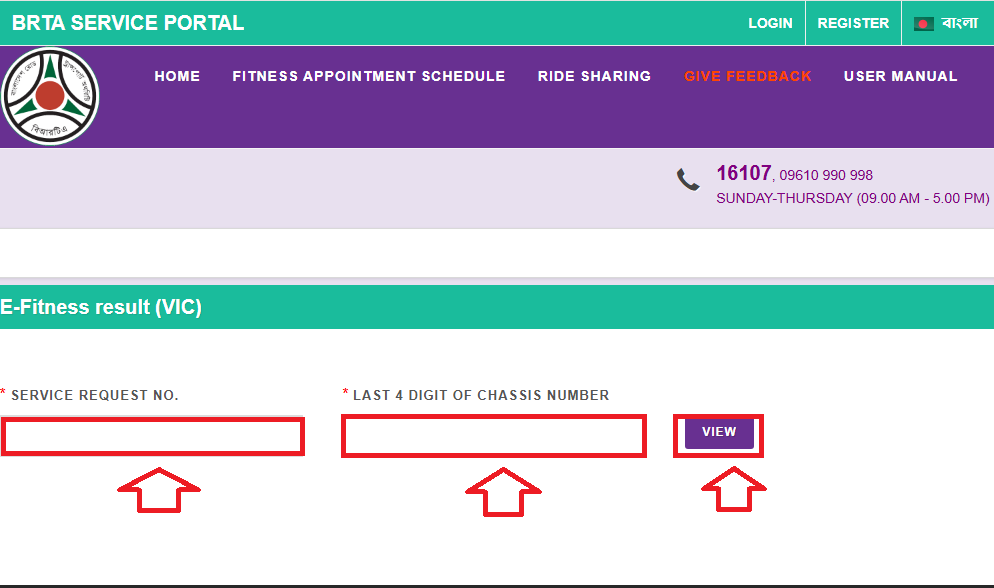
Step 3: Enter Required Information
To retrieve your e-fitness result, you’ll need to provide the following details:
Ensure that you enter the exact digits as listed on your vehicle registration paper.
Step 4: Click on the “View” Button
After entering your details, click on the “View” or “Check Result” button. Your fitness certificate status will be displayed immediately.
What to Do If Your E-Fitness Result Is Not Showing?
If the result does not appear or shows an error, it could be due to:
You can contact BRTA Helpdesk in such cases:
| Contact Channel | Details |
|---|---|
| BRTA Call Centre | 16107 or 09610 990 998 |
| BRTA Website | www.brta.gov.bd |
| BRTA Email Support | [email protected] |
| Nearest BRTA Office | Visit in person |
Important Tips for Vehicle Owners
Here are some helpful suggestions to avoid issues with your BRTA E-Fitness result:
How Often Should You Check BRTA Vehicle Fitness?
In Bangladesh, fitness certification must be renewed:
You should always check the BRTA E-Fitness result before your fitness certificate expiry to avoid penalties.

Who Needs BRTA E-Fitness Results?
The E-Fitness Result (VIC) is essential for:
FAQS: BRTA E-Fitness Results
BRTA generates this number when you apply for a vehicle fitness inspection.
All vehicle types registered with BRTA can check their E-Fitness results online.
BRTA certificates are only valid within Bangladesh. Additional permits are required for international travel.
Conclusion
BRTA E-Fitness Result (VIC) system makes checking your vehicle’s fitness certificate online a snap. Vehicle owners across Bangladesh can make compliance hassle-free with this service, which promotes transparency and reduces physical visits to BRTA offices.
Whether you own a personal car or manage a fleet of commercial vehicles, stay up-to-date on your vehicle’s fitness status by using the BRTA Service Portal regularly.