BRTA Login – BSP BRTA gov bd login


 August 2, 2026 10:28 am
BRTA Login. Bangladesh Road Transport Authority (BRTA) Login is an online service provided by the Ministry of Road Transport & Bridges to citizens to manage all transport-related tasks safely and efficiently. All government services are accessible through a login page on the government portal, such as learning to drive, renewing your license, and paying taxes.
In order to access the full range of BRTA services, users simply enter their registered mobile number and password – saving time, avoiding long queues, and helping to realize the vision of Digital Bangladesh.
What is BRTA Login?
BRTA Login is the official digital gateway for accessing Bangladesh Road Transport Authority online services. Registered users can access the following features through this secure login system:
- Renewal or application for a driving license
- Ensure that the vehicle is registered and in good working condition
- You can make online payments for fees
- Driving tests should be scheduled
- Status tracking for applications
- Certificates and receipts can be downloaded or printed.
Why is BRTA Login Important?
The BRTA offices used to be packed with applicants who had to wait in long queues and visit multiple times to complete even the simplest tasks. BRTA Login allows you to:
- Save time and avoid unnecessary travel
- Get real-time updates and notifications
- Reduce paperwork and manual errors
- Track all your transport-related records in one place
- Receive faster service delivery
In short, the BRTA Login system is helping build a smart, efficient transport ecosystem in Bangladesh">in Bangladesh.
How to Login BRTA Portal
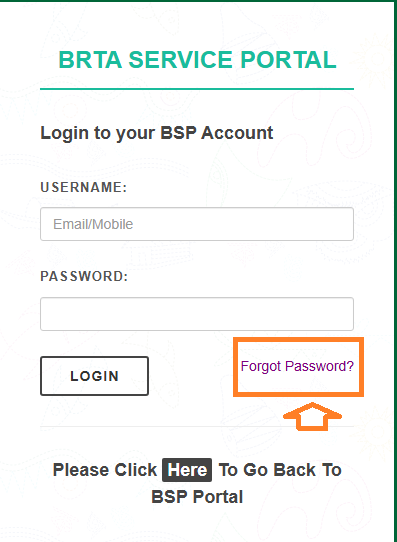
- Go to The Official BRTA Website. https://bsp.brta.gov.bd
- Click on “Login” (top-right corner)
- Enter your mobile number and password
- Complete the CAPTCHA and click “Login”
- Access your dashboard to manage services.
BRTA Login Forgot Password
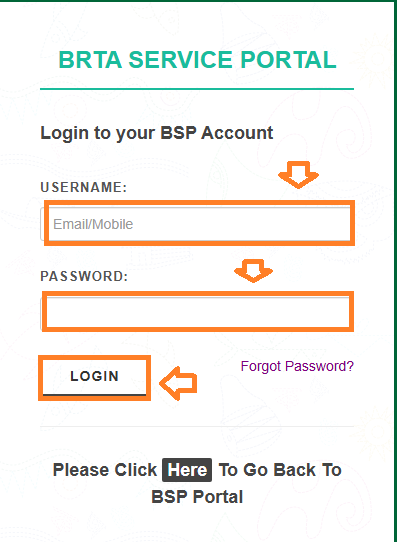
You can easily reset your password if you forget it:
- Go to the login page and click "Forgot Password".
- Please enter your registered mobile number.
- You will receive a reset OTP on your phone.
- Create a new password after entering the OTP.
- You will need to log in again with your new credentials.
Services You Can Access After BRTA Login
Driving License Services
- Learner License: Obtain and manage learner's permits.
- Smart Card License: Obtain and manage a smart card driving license.
- License Renewal: Renewal of existing driving licenses.
- Duplicate License: In case of loss or damage, obtain a duplicate license.
- Driving License Status: View the status of an application for a driving license.
Vehicle Related Services
- Vehicle Registration: Ensure that new vehicles are registered.
- Vehicle Fitness: Schedule appointments for vehicle fitness certificates.
- Tax Token: Managing and paying vehicle taxes.
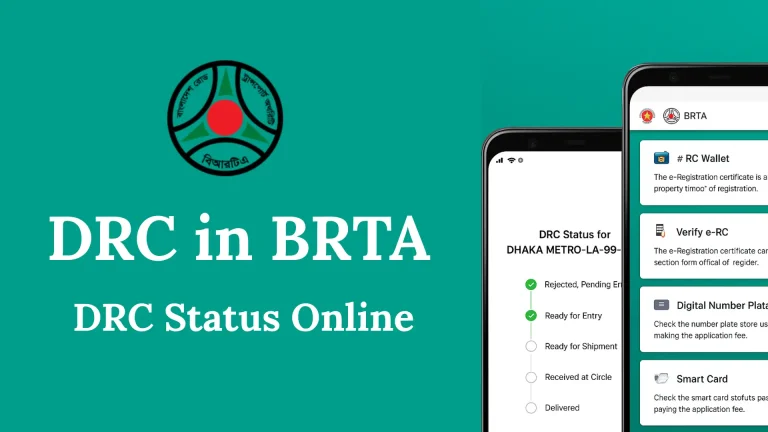
- Digital Registration Certificate (DRC): Request and manage DRCs.
- Retro-Reflective Number Plate: Request a retro-reflective number plate.
- RFID Tag: Managing RFID tags for vehicles.
- Vehicle Details: Verify the registration, engine, and chassis numbers of the vehicle.
Common BRTA Login Issues and How to Fix Them
BRTA Service Portal users may have difficulty accessing their accounts. Several users experience login or registration issues due to technical or user-related reasons. Below is a simplified breakdown of the most common issues and how to resolve them:
1. Incorrect Username or Password
- One of the most frequent login problems
- Often caused by typos, wrong case (capital/lowercase), or forgotten credentials
- Solution: Double-check spelling, avoid extra spaces, and reset password if needed
2. SMS OTP (One-Time Password) Not Received or Invalid
- Sometimes users don’t receive the verification code
- OTP might be delayed or entered incorrectly
- Solution: Ensure mobile number is correct, check signal strength, and re-request OTP
3. CAPTCHA (Security Code) Errors
- The CAPTCHA is used to prevent bots from accessing the system
- Entering the code incorrectly will block the login
- Solution: Refresh the CAPTCHA and re-enter it carefully
4. Browser Compatibility Issues
- The BRTA portal may not work well on outdated or unsupported browsers
- Solution: Use an updated version of Google Chrome, Mozilla Firefox, or another supported browser
5. Registration Problems
- Users may enter wrong info during account creation (e.g. invalid NID, wrong phone number)
- Verification via email or mobile may also fail
- Solution: Review your information before submitting and ensure all fields are correct
6. Account Lockout After Multiple Failed Attempts
- The system may lock your account temporarily after too many failed login attempts
- Solution: Wait for a few minutes or contact BRTA support for assistance
7. Temporary System Errors
- Sometimes the portal experiences maintenance or server downtime
- Solution: Wait and try again later, or check the BRTA website for announcements
Read Also : How to Pay Your BRTA Tax Token Renewal Fee 2026
FAQS: About BRTA Login
The login page is available at https://bsp.brta.gov.bd
For account registration, NID is required.
When registering or renewing a vehicle's registration, owners can obtain the digital number plate from official BRTA registration centers.
Conclusion
BRTA login portal is a major step toward building a digital Bangladesh. You can now obtain everything from driving licenses to fitness certificates online.
Using the portal saves you time and reduces your dependency on intermediaries.




One Comment