BRTA Service Portal -BSP Online Guide in Bangladesh

The BRTA Service Portal is a fast and easy way to access all driving licence services online in Bangladesh. Instead of standing in long queues, users can now apply for a learner licence, smart card licence, licence renewal, or a duplicate licence directly from home. The portal also allows secure online fee payment, making the full process simple and hassle-free. It is the official digital platform that helps drivers save time, avoid paperwork, and complete their BRTA tasks quickly and safely.

BRTA Fee Calculator

Fee calculator allows customers to calculate their fees.

bangladesh payment verification

Payment Verification

Payment can be verified by the customer

bank list

Bank List

Fee-paying banks that customers can use.

Driving Exam (DCTC) Result

Driving Exam (DCTC) Result

All divisions and districts are listed in the DCTC results.

trustee board certificate

Trustee Board Certificate

You can easily perform a Trustee Board Certificate check

E-Fitness result (VIC)

Check your Vehicle E-Fitness result (VIC) on the BRTA Service Portal

BRTA Service Portal (BSP) is an online platform where users can easily access different BRTA services. Through this portal, anyone can apply for a learner driving licence, smart card driving licence, licence renewal, or a duplicate licence. You can also pay the required fees for these services directly on the portal.

BRTA Service Portal - How To Access BRTA Service

Checking your Trustee Board Certificate is simple and secure when you use the official BRTA website. I’ve personally gone through this process, and it takes just a few minutes to verify your certificate online. Here how you can do it safely:

Click the Verify button to see your certificate status instantly.

  1. Visit the BRTA Official Website.
  2. Go to the “Certificate Verification” section.
  3. Enter your Transaction Number.
  4. Input the last 4 digits of your vehicle chassis number.
  5. Click On “View” Button

Checking your Vehicle E-Fitness Result in Bangladesh has never been easier. Using the official Bangladesh Road Transport Authority (BRTA) Service Portal, you can securely view your vehicle’s e-fitness status anytime. I personally tried this process, and it’s fast, safe, and straightforward — no need to visit a BRTA office.

Here’s how to check your Vehicle E-Fitness Result (VIC):

  1. Go to the official BRTA Service Portal
  2. open the Vehicle Fitness Result/Certificate page.
  3. Enter your Service Request Number and the last four digits of your vehicle chassis number.
  4. Click View Result to instantly see your e-fitness status on the screen.

This system ensures your vehicle records are secure, official, and always accessible online, helping you stay compliant with BRTA regulations without any hassle.

E-Tax Tokens and E-Licenses in Bangladesh can be verified easily through official online portals provided by authorized institutions like the Bangladesh Road Transport Authority (BRTA). These platforms allow citizens to quickly and securely check their tax tokens, driving licenses (including learner’s permits), and other vehicle-related documents from anywhere using a computer or smartphone.

Verification Methods:

  • Online Portals: The BRTA Service Portal allows users to verify the status of various documents, such as driving licenses and tax tokens. 
BRTA Service Portal - How To Access BRTA Service
  • Dedicated Apps: BRTA also offers apps for mobile devices that verify digital number plates, registration certificates, and e-RCs. 
  • Transaction Verification: For payments related to BRTA services, such as tax tokens, platforms like CNS Limited offer transaction verification services. 
  • Select Your Type of Transection
  • Enter the value of your search.
  • Please Enter The Code Beside.
  • Please click on Submit.
BRTA Service Portal - How To Access BRTA Service
  • Challan Verification: Tax payment receipts, including income tax and VAT, can be verified online through portals like the NBR-Sonali Bank TAX Portal. 
BRTA Service Portal - How To Access BRTA Service
  • E-TIN Verification: E-Returns Portal provide access to e-TIN (Electronic Taxpayer Identification Number) details and tax returns. 
BRTA Service Portal - How To Access BRTA Service

  • New vehicle registration
  • Ownership transfer
  • Route permit issuance
  • Fitness certificate scheduling and renewal
  • Digital Registration Certificate (DRC) download
  • Tax token application and renewal
  • Digital tax token download
  • Road permit renewal
  • bKash
  • Nagad
  • Rocket
  • Debit/Credit Cards
  • Online banking via selected commercial banks

Depending on the service, the following documents may be required:

  • National Identity Card (NID) 
  • Medical Certificate
  • Passport-size photo
  • Vehicle purchase invoice
  • Previous registration card (for ownership transfer)
  • Medical certificate (for new DL applicants)
  • Utility bill (for address proof)
  • Go To  the official BRTA service portal website.
  • Click on the “Registration” option.
  • Enter your Date of Birth.
  • Provide your NID (National ID) Number.
  • Enter your Mobile Number..
  • Click the “Search” button.
  • Enter the OTP (One-Time Password) sent to your mobile.
  • Please Enter  your “Surname
  • Enter your Date of Birth.
  • Enter your “NID Number“.
  • Enter your Mobile number.
  • Enter Your Email.
  • Choose a secure Password for your account.
  • Click the “Register” button to complete the process.
  • Enter your “Username” or registered mobile number.
  • Enter your password.
  • Click on the “Login” button to access your account.

For access to the BRTA Service Portal (BSP) via your mobile device, you will need to first download the appropriate app from the Google Play Store or another app store. Log in to your existing account using your username and password after installing the app. You can create an account through the app by providing the necessary information, including your National Identity (NID) number. 

  • Download the App: Visit the Google Play Store or another relevant app store to locate and download the official BRTA app. 
  • Install and Launch:
    Open the app after installing it on your mobile device. 
  • Login:
  • Enter your username and password if you already have an account. 
  • You can reset your password if you’ve forgotten it by clicking “Forgot Password.”
  • Register (if needed): Look for the “Register” or “Sign Up” option within the app if you’re a new user. 
  • If you wish to create an account, you will likely need to provide your NID number as well as other required information. 
  • Access Services: Through the app, you can access various BRTA services, such as checking your driver’s license status, vehicle registration details, or other relevant information. 

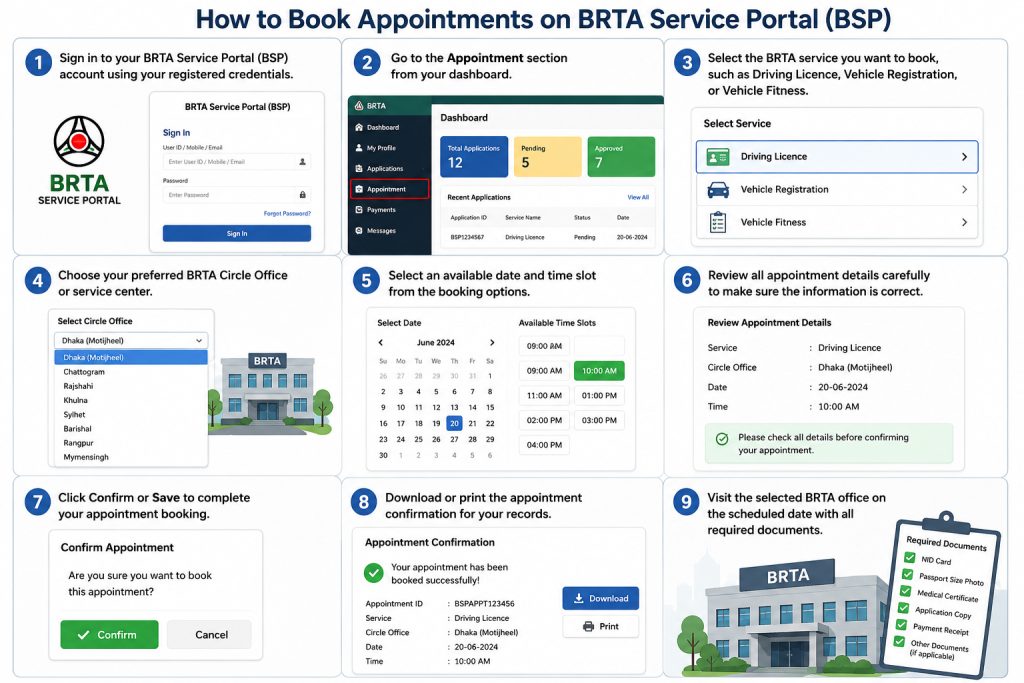
BRTA Service Portal (BSP) appointments can be scheduled by registering on their website first. You can select a service and available time slot after logging in and accessing the appointment section. 

  • Registration:
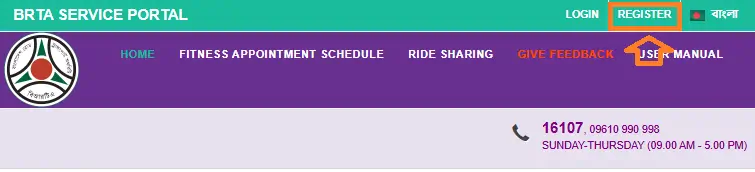
  • Go to the BRTA Service Porta. 
  • Select “Register” or “Registration” from the menu. 
  • Please provide your personal information, including your NID number, date of birth, and mobile phone number. 
  • Usernames and passwords should be created. 
  • Ensure that the registration process has been completed. 
  • Login: Once registered, log in to the BSP using your username and password. 
  • Schedule Appointment:
  • Goto the appointment section of the portal after logging in. 
  • Please Select the desired BRTA service (e.g., vehicle registration, driving license, fitness). 
  • You can select a time slot and date from the available options. 
  • Make sure your appointment is confirmed. 
  • Payment (if applicable):
  • In some cases, online payment is required for certain services. In this case, follow the instructions for completing the payment through a payment gateway like Bkash, Nagad, etc. 
  • Accessing Services:
  • You can access a variety of services through the BRTA Service Portal, including:
  • Obtaining a new driving license (learner’s permit, smart card). 
  • Driving license renewal. 
  • Driving license duplicate application. 
  • Online fee payment. 
  • Appointment schedules are checked. 
  • Getting access to other relevant services. 
  • Confirmation and Preparation:
  • You will receive a confirmation email or message. 
  • Make sure you have all the necessary information and documents for the service you have chosen. 

Bangladesh Road Transport Authority (BRTA) uses SMS code 26969 for some of its services. Send an SMS to this number with the keyword NP DRC to get information about a Digital Registration Certificate (DRC). The BRTA also has a general SMS service number, 28787, where you can text “Help” to learn about other e-Traffic SMS features. 

  • Open the messaging app on your phone.
  • New messages can be created.
  • NP DRC (without the quotes) should be typed in the message body.
  • Message 26969 with the message. 

For more information about other BRTA services, you can:

  • You can reach 28787 by sending a message.
  • Check out the BRTA Service Portal.
  • BRTA hotline numbers are 16107 or 09610 990 998 (Sunday-Thursday, 9 AM to 5 PM). 

Driving license applications, renewals, and other services are available through BRTA BSP (BRTA Service Portal). The website allows users to apply for a driving license online, pay the fee, select the test date, and download the license. 

For driving license related services, you can use BRTA BSP (BRTA Service Portal):

  • Application for new license: Choosing BSP as your licensing agency can result in you being issued a learner or apprentice driving license. 
  • Selection of exam date and venue: It is possible to select the exam date and location online after applying. 
  • Fee submission: Fees for driving licenses can be paid online through BSP. 
  • License Renewal :BSP is available for renewing driving licenses. 
  • E-Driving License: It is possible to download an e-driving license from BSP, which can be displayed on a smartphone and used. 
  • License Verification: On the BSP website or the BRTA Sheba app, you can scan the QR code to verify the license. 
  • Other services: BSP also provides information related to driving licenses, such as license status information. 
  • Go to BRTA BSP website (https://bsp.brta.gov.bd/).
  • Create an account if you do not already have one (you will need your National Identity Card (NID)).
  • From theDriving License option, select the required service.
  • Upload the required documents and fill out the application form.
  • Online payment of the prescribed fee is accepted.
  • Choose a location and date for the exam.
  • Use the BRTA Sheba app or BSP website to verify the license, if necessary. 

BRTA Service Portal (BSP) requires a medical certificate to apply for a driving license. The purpose of this certificate is to verify whether a candidate’s physical fitness is suitable for obtaining a license. A medical certificate must be uploaded when applying online through the BRTA Service Portal (BSP). 

Medical certificate

  • Driving license applicants need a medical certificate to verify their physical fitness.
  • Applicants are physically fit to drive if they pass this test.
  • Information about vision, hearing, and other physical abilities is usually included on medical certificates. 
  • There may also be evidence of drug or alcohol abuse in some cases. 

Uploading medical certificates to the BRTA Service Portal (BSP):

  • Log in to your account on the BRTA Service Portal (BSP).
  • Select “New Driving License” or “License Renewal”.
  • Select the “Medical Certificate” option and click “Upload”.
  • Select the “Medical certificate” file on your computer and upload it.
  • Click the “Save” or “Submit” button once the information has been uploaded. 

BRTA Service Portal (BSP) applicants must upload a medical certificate to apply for their driving license. You can complete this process online. 

IssuesSolutions
Payment not ReflectingWait 24 hours or contact support via the portal
OTP not received Try using a different mobile number or check network settings
Error in uploaded documentsRe-upload files with correct format and size
Application rejected Follow feedback from BRTA and reapply with corrected information

  • Convenience: With the BRTA online services, citizens can apply for learner’s licenses, smart card licenses, renewals, and duplicates from anywhere with an internet connection, eliminating the need to visit BRTA offices regularly. 
  • Reduced Corruption and Delays: Streamlining the application process reduces the chance of corruption and bribery, as well as bureaucratic delays. 

  • Real-time Updates: Applications can be tracked online and applicants can receive updates on their exam results and other stages. 
  • Secure Online Payments: The payment of fees can be made online through a variety of digital payment systems, further simplifying the process and enhancing security. 
  • QR Code for Temporary Documents: For verification purposes, temporary driving permits and acknowledgment slips are provided with QR codes. 
  • Smart Card Delivery: Applicants can receive their smart card driving licenses by mail, eliminating the need for physical collection

1. Saves Time

No need to visit BRTA offices multiple times.

2. Reduces Corruption

Online payments and applications reduce middlemen.

3. Transparent Process

Users can track applications in real time.

4. User Convenience

Accessible from home via mobile or computer.

5. Centralized Records

All driving and vehicle data is stored digitally.

1. Server Overload

The portal may become slow during peak hours.

2. Technical Errors

Users sometimes face loading or submission issues.

3. Limited Digital Awareness

Some citizens struggle with online forms.

4. OTP Delays

Verification codes may arrive late due to network issues.

Bangladesh Road Transport Authority (BRTA’s) Service Portal is open from 9:00 am to 5:00 pm from Sunday through Thursday. Through their website, you can access the portal and its services, including making appointments. There are also contact numbers for inquiries on the portal: 16107 and 09610 990 998. 

BRTA Service Portal operating hours are: 

  • Sunday – Thursday: 9:00 AM to 5:00 PM
  • Friday & Saturday: Closed

Although BRTA offices remain open on Saturdays, the online portal’s operating hours remain the same. On the BRTA Service Portal, you can find more information and register for an account.

Office Address

  • Bangladesh Road Transport Authority(BRTA)
    Head Office, BRTA Bhaban
    Chairmanbari, New Airport Road
    Banani, Dhaka-1212,
    Bangladesh.
  • Email: [email protected]
  • Phone: 16107, 09610 990 998S
  • SUNDAY-THURSDAY (09.00 AM – 5.00 PM)
  • Location

You can apply for or renew driving licenses, register vehicles, pay road tax, check DRC status, and book appointments for driving tests—all online via the BRTA Service Portal.

Download the “BRTA Sheba” app from the Play Store, enter your NID and mobile number, verify via OTP, and follow the steps to complete your registration.

Yes, you can securely pay BRTA service fees using mobile banking platforms like bKash, Nagad, Rocket, or via debit/credit cards directly on the portal.

BRTA Service Portal makes transport services easier and more accessible for Bangladeshi citizens. Users can handle everything digitally, from applying for a driving license to paying fees. With features like secure payments, SMS services, and real-time application tracking, BRTA ensures a smooth, transparent, and user-friendly process.